Pharmacy Inventory Tracker v2.1
A free offline Excel workbook that tracks stock, expiry and reorder levels for a health facility pharmacy. 245 drugs pre-loaded.
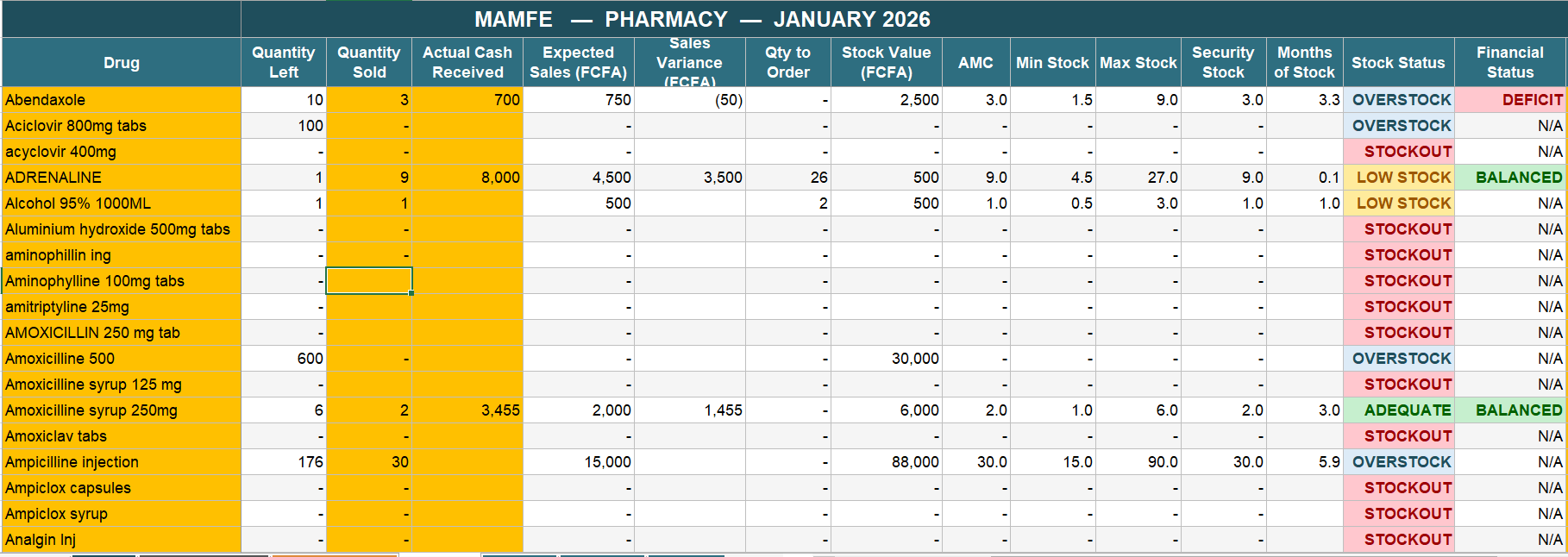
Pharmacy management software is built for retail pharmacies in cities: stable power, an IT person down the hall, and a subscription between 30,000 and 180,000 FCFA a month. None of that describes the average African district health facility. This workbook was built in a District Medical Officer's office in Mamfe and refined over 18 months of real use across the district.
[ DOWNLOAD ]
What it does
Reorder levels calculated for you
Average Monthly Consumption uses a 3-month rolling average, the WHO standard. From that the workbook computes Minimum Stock, Maximum Stock, Security Stock and the Quantity to Order for every drug.
Stock status at a glance
Every drug is colour-coded STOCKOUT, LOW STOCK, ADEQUATE or OVERSTOCK, so the pharmacist sees what needs attention without reading a single number.
Batch and expiry tracking
Each batch carries its expiry date and the workbook applies FEFO, First Expiry First Out, so the stock closest to expiring is the stock that moves first.
245 drugs already loaded
The drug list comes filled in, with 55 free slots for whatever your facility stocks that the list does not cover. 18 sheets, covering all 12 months of the year.
Every formula is visible
If the Director asks why a drug is flagged for reorder, the pharmacist clicks the cell and shows the arithmetic. There is no black box and no vendor to call.
It is a file, not a service
No licence server, no cloud sync, no account. It opens in Excel, LibreOffice, WPS, Google Sheets and mobile spreadsheet apps, whether or not the generator is running.
How to use it
-
Open the workbook and go to the Cover sheet. Type your facility name in the orange cell.
-
Open JAN_26 and review the pre-loaded drug list. Adjust prices, or add your own drugs.
-
Each month, fill in three columns: Stock Received, Quantity Sold, Cash Received.
-
At month-end, open the DASHBOARD sheet and print it for the review meeting.
Who it is for
District Medical Officers, facility managers, district pharmacists and M&E officers responsible for keeping a pharmacy stocked in a low-resource setting.